On this page
Picture a Thursday afternoon. Outlook stops loading. Teams goes quiet. The news shows flights grounded across a country, and by Monday a large bank and Apple Pay are having trouble too. If you run a business, one question lands on your phone within minutes: "Are we being hacked?" How fast and how honestly your team can answer it decides whether the next few hours are an inconvenience or a crisis.
Last week that was not a tabletop exercise. Between 12 and 17 November 2026, Microsoft 365, US air traffic control, JPMorgan Chase, Apple and a classified NSA network all had public failures. Social media called it a coordinated cyberattack. Every official finding so far says otherwise. This post covers what actually happened, how to tell an outage from an attack in the first 30 minutes, and the one risk that is real during any outage: attackers using the confusion as cover. Our team built a small lab to show that last point with real logs. The technical detail is there for your security team; the decisions in the last two sections are for you and your board.
What actually happened in the week of 12 November
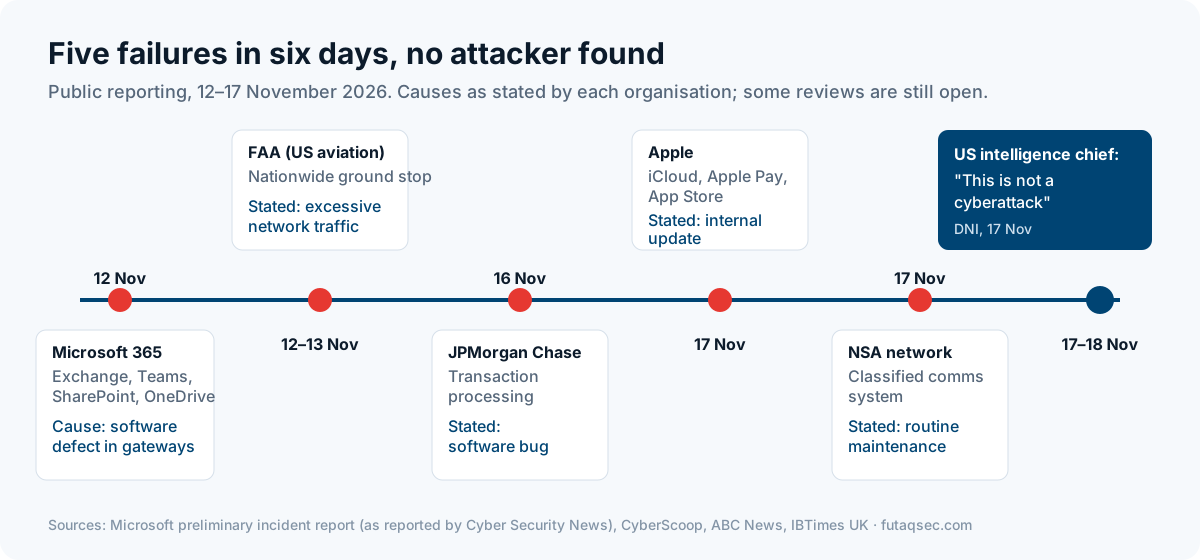
Here is the week as reported, with the cause each organisation gave. We have kept to what the sources say.
| Date (2026) | What failed | Stated cause | Attack? |
|---|---|---|---|
| 12–13 Nov | Microsoft 365: Exchange Online worst hit, plus Teams, SharePoint and OneDrive | A software defect in Microsoft's networking gateway servers | Microsoft said it was not aware of malicious activity |
| 12–13 Nov | US FAA: a nationwide ground stop of about 4 hours 45 minutes | "Excessive network traffic" disrupting communications and radar; root cause still under investigation | CISA's acting director said nothing found indicated malicious cyber activity |
| 16 Nov | JPMorgan Chase: transaction processing | A software bug | None identified |
| 17 Nov | Apple: iCloud, Apple Pay, App Store | An internal update | Apple denied an attack, according to IBTimes UK |
| 17 Nov | NSA internal classified communications | Scheduled routine maintenance | None identified |
On 17 November the US Director of National Intelligence, Jay Clayton, said on CNBC: "This is not a cyberattack, and this is not a coordinated effort by a nation-state." He put the failures down to the routine work of patching and upgrading systems. Secretary of State Marco Rubio said the US was "not under systemic attack" and that each event was "distinct". Senator Mark Warner said there was "no indication" of a cyberattack but that investigators "still need to get to the bottom of these incidents".
That last part matters. "No evidence of an attack" is not the same as "proven not to be an attack". The FAA's root cause is still open. Microsoft's report is preliminary. But the reasonable reading today is a run of bad luck in very complex systems, not a war.
How one bug took down Microsoft 365
The Microsoft failure is the one most of our readers felt, and its cause is a useful lesson. Microsoft's preliminary report, as summarised by Cyber Security News, describes four things lining up.
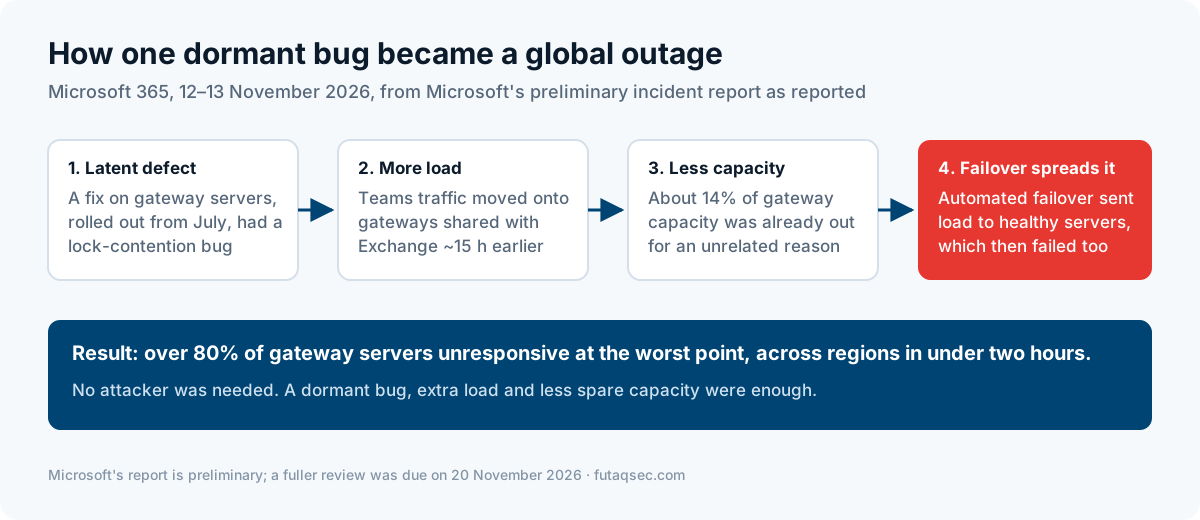
- A dormant defect. A fix rolled out to Microsoft 365 gateway servers from July contained a lock-contention bug in an internal Windows process. Lock contention means many threads wait for the same lock, so work piles up instead of finishing.
- More load. About 15 hours before the outage, Teams traffic moved onto the gateways it shares with Exchange Online.
- Less spare capacity. Around 14% of gateway capacity was already out because of a separate issue.
- Failover made it worse. Automated failover moved traffic from struggling servers to healthy ones, which then hit the same bug. At the worst point more than 80% of gateway servers were unresponsive, and the failure crossed regions in under two hours.
The fix was to roll Windows connection handling back to its earlier state and bring server groups back gradually. The outage ran from 16:20 UTC on 12 November to 16:10 UTC on 13 November.
No attacker was needed. A bug that had sat quietly for months, a change in traffic and a shortage of spare capacity were enough. When we test resilience in our engagements, this is the pattern we look for in clients' own systems: failover that assumes the healthy node will stay healthy, and changes that are safe alone but dangerous together.
Outage or attack: the first 30 minutes
When a key service fails, people tend to pick one story early and stop looking. The better habit is to run two tracks at the same time.
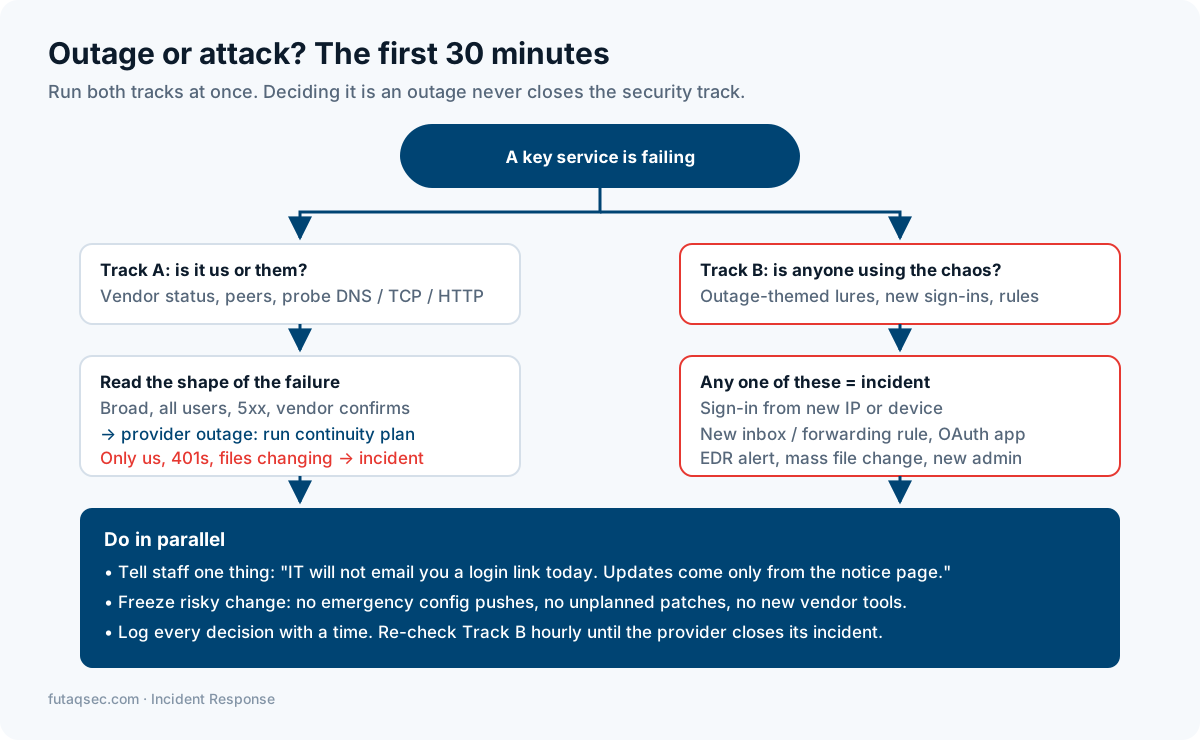
Track A: is it us or them? Check the provider's status page and the admin portal's service health page (in Microsoft 365, the Service health page in the admin centre). Ask a peer at another company. Then test the dependency at three layers yourself, because a status page can lag behind reality.
Track B: is anyone using the chaos? This track stays open even after Track A says "provider outage". It looks for the things that should never happen during an outage: new sign-ins from unknown places, new mailbox rules, new admin accounts or OAuth app consents, and outage-themed emails or phone calls to staff.
The shape of the failure usually tells you which way Track A is heading.
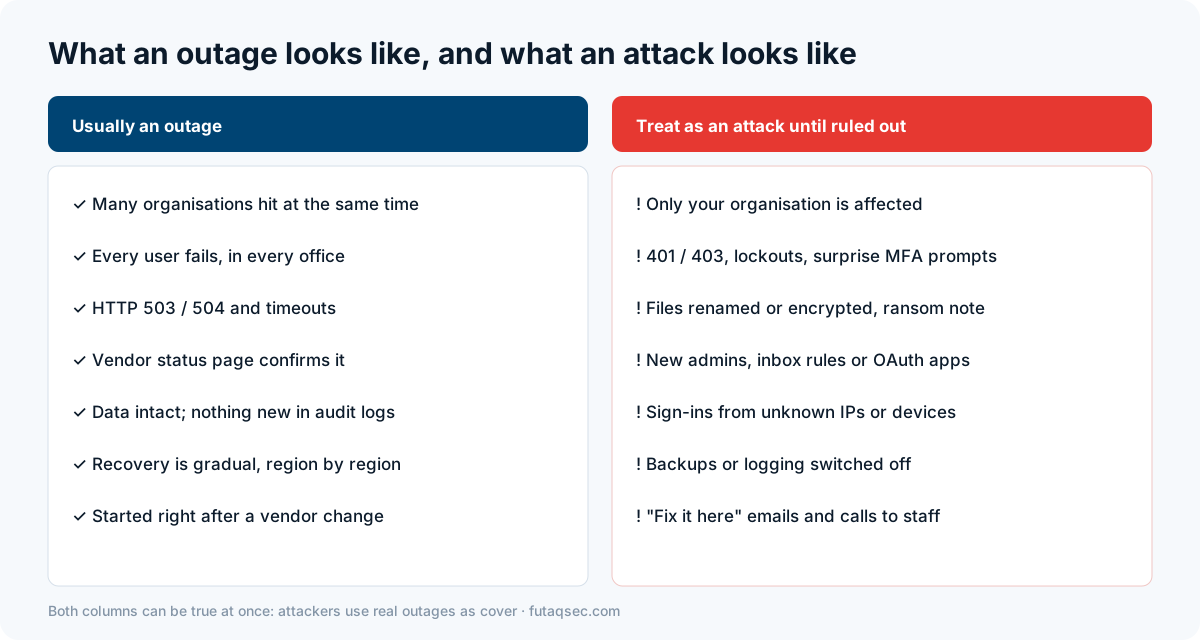
A provider outage is broad, hits every user and returns server errors (HTTP 503 "service unavailable", 504 "gateway timeout") or plain timeouts. An attack on you is usually narrow: only your organisation, with authentication errors (401, 403), lockouts, surprise MFA prompts or files changing. Neither signal is proof alone. A ransomware group that has encrypted your servers can also produce "everything is down".
Our "is it us or them?" check
We wrote a short Python script that tests each dependency at the DNS, connection and HTTP layers and reports which one failed. Where it fails tells you where to look: DNS failure points at your resolver or their DNS, connection failure at the network path, and a 5xx at the provider.
import socket, time, urllib.request, urllib.error
from urllib.parse import urlparse

def probe(url):
    u = urlparse(url); port = u.port or (443 if u.scheme == "https" else 80)
    try: ip = socket.gethostbyname(u.hostname)
    except OSError: return f"DNS FAIL      {url}  -> name does not resolve (our resolver, or their DNS)"
    try: socket.create_connection((ip, port), timeout=3).close()
    except OSError: return f"CONNECT FAIL  {url}  ({ip}) -> network path or host down"
    t = time.time()
    try: code = urllib.request.urlopen(url, timeout=5).status
    except urllib.error.HTTPError as e: code = e.code
    except OSError as e: return f"HTTP FAIL     {url}  -> {e}"
    tag = "[+] OK        " if code < 500 else "[-] PROVIDER  "
    return f"{tag}{url}  HTTP {code} in {int((time.time() - t) * 1000)} ms"
In the lab we ran it against four local test services: one healthy, one returning 503 like a struggling provider, one not listening, and one name that does not exist.
$ python probe.py http://127.0.0.1:8081/ http://127.0.0.1:8082/ http://127.0.0.1:8083/ http://status.provider.invalid/[+] OK http://127.0.0.1:8081/ HTTP 200 in 107 ms[-] PROVIDER http://127.0.0.1:8082/ HTTP 503 in 16 msCONNECT FAIL http://127.0.0.1:8083/ (127.0.0.1) -> network path or host downDNS FAIL http://status.provider.invalid/ -> name does not resolve (our resolver, or their DNS)Run it from two places, such as the office and a phone hotspot. If both fail the same way, the problem is almost certainly not your network.
The real risk: attackers who use the outage as cover
Outages do not need to be attacks to help attackers. When CrowdStrike's faulty update crashed Windows machines worldwide in July 2024, CISA warned that threat actors were taking advantage of the incident for phishing and other malicious activity. The pattern is simple. Staff are anxious, IT is busy, and an email saying "Outlook is down, re-verify your account to restore your mailbox" sounds exactly right.
To show what that looks like in logs, we built a synthetic tenant: 40 users at example.com, eight hours of mail, sign-in, proxy and audit logs, and a simulated provider outage from 16:20 to 21:00 in which about 85% of mail requests fail. Inside that window we planted one compromise.
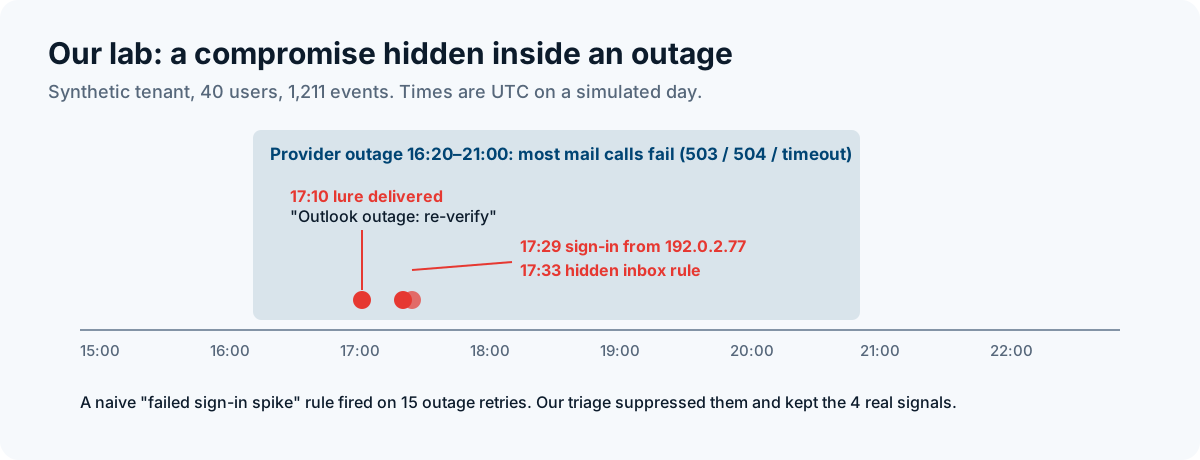
These are the four planted events, exactly as the generator wrote them.
$ grep -E "micros0ft|m365-restore|192.0.2" lab_logs.jsonl{"time": "2026-11-12T17:10:00Z", "log": "mail_gateway", "user": "[email protected]", "from": "[email protected]", "subject": "Outlook outage: re-verify your account to restore mail", "url": "https://m365-restore.example/login", "verdict": "delivered"}{"time": "2026-11-12T17:14:00Z", "log": "proxy", "user": "[email protected]", "ip": "10.0.0.17", "host": "m365-restore.example", "status": 200}{"time": "2026-11-12T17:29:00Z", "log": "signin", "user": "[email protected]", "ip": "192.0.2.77", "result": "success", "mfa": "satisfied_by_token", "country": "XX"}{"time": "2026-11-12T17:33:00Z", "log": "audit", "user": "[email protected]", "ip": "192.0.2.77", "op": "New-InboxRule", "detail": {"name": ".", "from": "*@example-bank.example", "moveTo": "RSS Feeds", "markAsRead": true}}Read in order, that is a familiar story. A lookalike sender (a zero instead of an "o") sends an outage-themed lure. The user visits the fake page. Fifteen minutes later someone signs in as that user from an unknown address, with MFA satisfied by a token rather than a fresh prompt, which is what a stolen session looks like. Four minutes after that, a rule named "." moves the bank's emails into a folder nobody opens and marks them read. MITRE ATT&CK tracks that last step as T1564.008, email hiding rules. It is a classic first step towards invoice fraud. We cover the sign-in side of this in more depth in detecting stolen-session sign-ins in Entra ID.
Detecting it without drowning in outage noise
Our first attempt was the obvious rule: alert when failed sign-ins spike. It fired, and every hit was useless.
naive rule (failed sign-ins in window > 10): 15 -> fires, all {'ServiceUnavailable'}During an outage, failed sign-ins mostly mean the provider is down and users keep retrying. A rule tuned for normal days becomes noise on the day you most need it. So we changed the question. Instead of "is something failing?", we asked "is anything new happening that an outage cannot explain?" Our triage script does two things: it measures the shape of the failure, and it looks for security events that do not depend on the service working.
# Excerpt from triage.py. Part 1, shape: share of users failing per 15-minute bucket, and which codes
for k in sorted(buckets):
    seen, failed, codes = buckets[k]
    if len(failed) / len(seen) >= 0.5:
        print(f"{k:%H:%M} {len(failed):>2}/{len(seen):<2} users failing  codes={dict(codes)}  -> BROAD + 5xx/timeout = provider-shaped")

# Part 2, signals an outage cannot explain. known_ips = each user's past successful sign-in addresses
for r in rows:
    if r["log"] == "signin" and r["result"] == "failure" and r.get("error") == "ServiceUnavailable":
        benign += 1; continue                    # outage retries: count them, do not alert
    if r["log"] == "mail_gateway" and any(w in r["subject"].lower() for w in ("outage", "restore", "re-verify")):
        print(f"[!] {r['time']} outage-themed lure delivered to {r['user']} from {r['from']} -> {r['url']}")
    if r["log"] == "signin" and r["result"] == "success" and r["ip"] not in known_ips[r["user"]]:
        print(f"[!] HIGH {r['time']} {r['user']} signed in from new IP {r['ip']} ...")
    if r["log"] == "audit" and r["op"] == "New-InboxRule":
        print(f"[!] HIGH {r['time']} inbox rule '{r['detail']['name']}' by {r['user']} ...")
The result, trimmed to the first and last buckets of the outage:
$ python triage.py lab_logs.jsonl== failure shape (mail API) ==16:15 18/28 users failing codes={'504': 7, 'timeout': 3, '503': 10} -> BROAD + 5xx/timeout = provider-shaped16:30 28/31 users failing codes={'503': 16, 'timeout': 9, '504': 5} -> BROAD + 5xx/timeout = provider-shaped# ... 16 more buckets ...20:45 24/27 users failing codes={'503': 12, '504': 12, 'timeout': 7} -> BROAD + 5xx/timeout = provider-shaped == security signals during the window ==[!] 2026-11-12T17:10:00Z outage-themed lure delivered to [email protected] from [email protected] -> https://m365-restore.example/login[!] 2026-11-12T17:14:00Z [email protected] visited m365-restore.example[!] HIGH 2026-11-12T17:29:00Z [email protected] signed in from new IP 192.0.2.77 (mfa=satisfied_by_token, country=XX)[!] HIGH 2026-11-12T17:33:00Z inbox rule '.' by [email protected] from 192.0.2.77: *@example-bank.example -> RSS Feeds, read=True[+] 15 sign-in failures were 'ServiceUnavailable' from known IPs: outage noise, suppressedTrack A got its answer (broad, 5xx, provider-shaped) and Track B found the compromise, from the same logs. The 15 noisy failures were counted but not alerted.
If you run Microsoft Sentinel, the same idea looks like this. We tested the logic in Python on our generated logs, not in a live Sentinel workspace, so check the column names against your own tables.
// Inbox rules created from an IP the user has not signed in from in the last 14 days
let known = SigninLogs
    | where TimeGenerated between (ago(14d) .. ago(1d)) and ResultType == 0
    | distinct UserPrincipalName, IPAddress;
OfficeActivity
| where TimeGenerated > ago(1d)
| where Operation in ("New-InboxRule", "Set-InboxRule", "UpdateInboxRules")
| extend IPAddress = tostring(split(ClientIP, ":")[0])
| join kind=leftanti known on $left.UserId == $right.UserPrincipalName, IPAddress
| project TimeGenerated, UserId, IPAddress, Operation, Parameters
Tabletop: the day the internet goes dark
Last week's failures were separate and fixed within hours or a day. Use them as a rehearsal for a worse day. Here is a scenario we use for planning. It is invented, so run it with your team before it is ever real.
08:40. Email, Teams and your identity provider stop responding. Staff cannot sign in to anything that uses single sign-on. 09:15. Your internet provider's status page will not load. Mobile data works but is slow. The news says several cloud providers are down in several regions. 09:50. A finance clerk gets a WhatsApp message from "IT support" with a link to "restore access". 10:30. A supplier phones to confirm "the new bank details you emailed this morning". Nobody in your company sent that email. 12:00. Your managing director asks whether to tell customers, the regulator and the insurer.
Questions to answer at each step:
- How do staff hear from leadership if email and chat are gone? Is there a phone tree or SMS list, and who keeps it current?
- Who decides "outage" or "incident", and on what evidence? Who can overrule them?
- Can anyone sign in to admin consoles if single sign-on is down? Where are the break-glass accounts kept, and when were they last tested?
- Which processes stop completely without the internet: payments, payroll, customer service? What is the manual fallback, and who has the paper copy?
- At 10:30, which rule stops a bank-detail change? It should be a call-back to a known number, never to a number in the email.
- At 12:00, what do your contracts and regulators require you to report, and by when, if it does turn out to be an attack?
The UK NCSC's free Exercise in a Box has ready-made scenarios in this style if you want a structured start. When we run tabletop exercises as part of incident response work, the gap we find most often is not technical. It is that nobody has written down who decides, and how people are told when the usual channels are gone.
Checklist for the next outage
- Bookmark the service health pages for your mail, identity, cloud and payment providers, and put them in the IR runbook.
- Keep a contact list (phone and SMS) for leadership and IT that works with email down. Print a copy.
- Test break-glass admin accounts that do not depend on single sign-on, at least twice a year.
- Prepare one staff message now: "IT will never send you a login link during an outage. Updates come only from [channel]."
- Alert on new inbox and forwarding rules, new OAuth consents and new admin roles, with no outage-time muting.
- Suppress outage noise narrowly: service-unavailable errors from known addresses only.
- Freeze non-urgent changes while a provider is unstable. Emergency fixes on top of an outage make the next outage.
- Require a call-back to a known number for any change to payment details, always.
- Run the tabletop above once this quarter.
For the people side of outage-themed lures, especially the phone calls, see helpdesk vishing: training the people attackers call.
Sources
- Microsoft 365 preliminary incident report (incidents EX1550543 and MO1550821), as reported by Cyber Security News, 16 November 2026. We could not read Microsoft's report directly; a fuller review was due on 20 November.
- CyberScoop: acting CISA director Nick Andersen on the outages, 17 November 2026.
- ABC News: statements from the DNI, the Secretary of State and Senator Warner, 17 November 2026.
- IBTimes UK: timeline, FAA, JPMorgan Chase and Apple causes, 18 November 2026.
- CISA alert, 19 July 2024: threat actors exploiting the CrowdStrike outage.
- MITRE ATT&CK T1564.008: Hide Artifacts: Email Hiding Rules. T1566: Phishing.
- Microsoft Learn: How to check Microsoft 365 service health.
- NCSC Exercise in a Box.
Written by
Muhammad Raheem
Chief Executive Officer, FutaqSec